Academic Affairs & Faculty Updates
Updates impacting instruction, Canvas, and scheduling
| Topic | Details |
| Census Roster Certification in Banner | You can now find the instructions for certifying rosters in the Faculty FAQ. |
| Canceled Class Notifications & Drops | In Banner, students are no longer automatically dropped from a section once it has been officially canceled. If a summer class has been canceled, A&R will clean up enrollments by Tuesday, July 7, and periodically thereafter. |
| Degrees/Certificates Completed in Spring | Any degrees or certificates completed before Summer 2026 will need to be applied for in the old SIS system for now. When students visit the graduation page, they'll automatically be redirected to the old system. |
| Attendance | The Bear Cub Hub has an Attendance button on the Faculty Dashboard. You may use this tool to track attendance, or use the methods that worked for you previously. Attendance tracking policies remain the same as under the previous SIS system. You can review those policies by visiting the Faculty FAQ under "Which classes need to take attendance?" |
| Hybrid Classes |
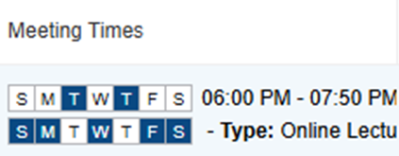
Beginning in the fall Schedule, Hybrid courses will show two meeting lines, one for in-person meetings and the other for online “meeting” times. The line with online days will indicate all days not marked on the in-person line. |
| Banner Questions | If you have a question about the use of Banner, and you are unable to find an answer on the sis.santarosa.edu website, please go to the Get Help menu at the top of the page and click on Ask a Question. Your question will be answered as soon as possible. NOTE that the college is closed tomorrow (Friday) and Monday, and it will most likely be Tuesday before a staff person can review and respond. |
| 25 Live | 25 Live is the replacement for the Event Management System and has gone live. Details will follow regarding training. |
Student Services Update
Updates impacting admissions, registration, and student support
| Topic | Details |
| Portal Session Timeouts & Reloading Issues | Users have reported workflow disruptions related to session timeouts and system navigation. Specifically, after an idle period or when moving between systems, the portal occasionally freezes or fails to reload properly. Current Action & Solutions: Immediate Workaround: Users can resolve a frozen screen or loading loop by clearing their browser cache/history and logging back into the system. Communicating Expectations: We are working to provide clear guidance regarding standard security timeout limits so users can manage sessions effectively. Investigating System Optimizations: We are actively reviewing background timeout and navigation configurations to minimize these disruptions and establish a more seamless workflow across all portal users. |
| Student Mobile Registration Challenges | Reports indicate some students have experienced difficulty completing registration via mobile devices. Current Action & Solutions: Troubleshooting: Initial recommendations include standard browser troubleshooting (ensuring compatibility and clearing history/cache, especially if switching between multiple accounts). Resource Development: The team is actively reviewing existing support documentation to develop a quick, student-facing mobile troubleshooting FAQ or guide to address these specific mobile device barriers.
|
| Duplicated Student Records | Frontline staff have identified instances of duplicate student records in Banner (identical names and birthdates resulting in multiple student IDs). Current Action & Solutions: Reporting Workflow: Staff have been instructed to submit identified duplicates directly to Admissions & Records using the dedicated Formstack link: Merge Request for Multiple Student IDs - Intellistack. A&R is actively processing these requests to clean up the data. |
| Summer & Fall 2026 Enrollment Update | Below is the updated headcount comparison to the same point last year, reflecting our latest figures for the Summer and Fall 2026 terms: Summer Enrollment Comparison
Fall Enrollment Comparison
Context & Key Factors Our current enrollment numbers reflect system transition factors alongside enhanced data security measures:
The Admissions and Records teams are currently working extended evening and weekend hours to clear backlogs and resolve student registration barriers. Thank you all for your patience and flexibility as we work through these transitional hurdles. |
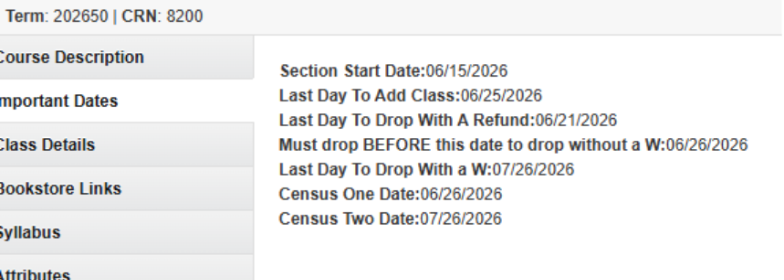
| Course Drop Deadline Discrepancy | A recent update to the drop deadlines in the online Schedule of Classes did not match the deadlines displayed in students' portal. As a result, some students who dropped from courses by the Drop without a W deadline were incorrectly assigned a "W" grade.
Admissions & Records is currently running a report to automatically remove these "W" grades from affected student records. No action is required from students.
To help prevent this issue in the future, all drop deadlines in the Schedule of Classes will clearly state that students must drop BEFORE the listed date.
|
| VTEA Survey Holds – Student Registration Not Impacted | Employees may hear from students who see a VTEA Survey Hold on their account. Information Technology has confirmed that these holds no longer prevent students from registering for classes. The hold is still applied as part of the survey process, but it is not functionally blocking registration and is removed within 15 minutes by an automated process. To help reduce confusion, there is also discussion about updating the student-facing language to avoid the impression that a hold still exists.
What employees should know:
|
Student & Faculty Support Resources
Keep these resources handy for troubleshooting
| Topic | Details |
| The Central Hub | The SIS Transition website remains the central hub for updates, training resources, FAQs, and troubleshooting information. If you have a question not answered in the FAQs, please submit it using the Ask a Question Form under Get Help. |
| Faculty Self-Service | Bear Cub Hub replaced the SIS Faculty portal. Faculty should review the Faculty Self-Service Quick Guide and become familiar with the Bear Cub Hub portal. |
| Student Access | Students gain access to Canvas once they are officially enrolled in the course. Due to FERPA regulations, students on the waitlist cannot be added to the Canvas course. |
| Prerequisite Issues | If students cannot register because of prerequisites, please direct them to Counseling. |
| Waitlists & Add Codes | Faculty can provide add codes to students beginning on the first day of class. Expect student questions regarding waitlists and add codes during the first week of the term. Keep add code and waitlist resources available. Training for Employees | Student Information System Student waitlist emails are sent only to Bearcubs email addresses. Bearcubs emails page for students: https://sis.santarosa.edu/activate-your-bear-cub-email |
| Time Tickets | Registration is controlled by a Time Ticket. Students must wait until their assigned registration date and time before registering. The Student Time Ticket Training Video is available here. |